

Every couple of years, Samsung ships a software update that everyone expects to be a giant leap forward and every couple of years the reality turns out to be quieter and more practical than the hype suggests.
One UI 9 is exactly that kind of update it doesn’t reinvent how a Galaxy phone looks or feels instead, it spends its energy fixing the small annoyances and stitching AI into places where you’ll actually notice it, rather than places where it just looks good in a keynote slide.
If you’ve been putting off reading about this update because you assumed it was another round of recycled marketing language, here’s a version written the way I’d explain it to a friend who just wants to know what’s changing on their phone.
Table of Contents
What Is Samsung One UI 9?
One UI 9 is Samsung’s latest version of its custom Android interface it is based on Android 17 and builds on the design and features introduced in previous One UI releases.
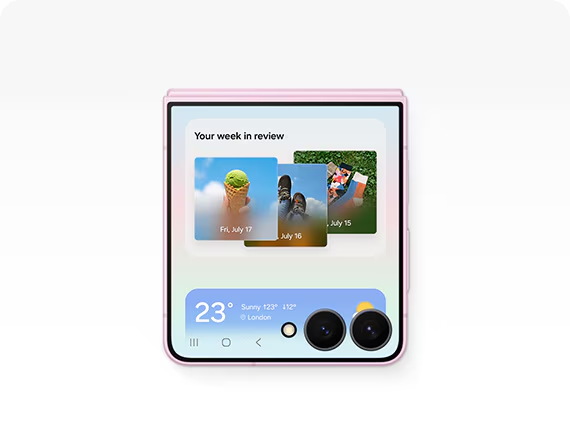
Rather than completely changing the galaxy experience, samsung has focused One UI 9 on making everyday interactions more useful samsung has expanded galaxy AI, improved existing tools such as photo assist, introduced new ai assisted features and added more privacy and security controls.
Samsung also describes One UI 9 as an experience designed to work across different Galaxy form factors including conventional smartphones, foldables and tablets.
That means One UI 9 is not just about adding another collection of features samsung is trying to make the software feel more aware of what the user is doing and reduce the number of steps needed to complete everyday tasks.
Read This Also: Whatsapp New Update: You Won’t Believe What Your Chats Are About to Look Like
Samsung One UI 9 Release Date
The One UI 9 rollout is already underway.
Samsung officially announced the wider rollout on September 16, 2026 starting with the Galaxy S26, Galaxy S26+ and Galaxy S26 Ultra before that, One UI 9 had already debuted on the Galaxy Z Fold8 Ultra, Galaxy Z Fold8 and Galaxy Z Flip8.
The important thing to remember is that samsung does not release a major One UI update to every eligible Galaxy device simultaneously.
The rollout depends on the specific phone or tablet, country, carrier and software certification as a result, two owners of the same Galaxy model can sometimes receive the update at different times.
One UI 9 and Android 17
One of the most important details about the update is that One UI 9 is based on Android 17.
That gives compatible Galaxy devices the foundation of Google’s latest Android release while allowing samsung to add its own interface, galaxy AI features, security technology and Galaxy specific functionality.
For users, this means the update is more significant than a normal monthly security patch it represents a new Android generation combined with samsung’s own software changes.
However, not every android 17 feature or every one ui 9 feature will necessarily be available on every galaxy model samsung specifically notes that ai functionality can vary according to device, language and region.
Samsung One UI 9 New Features
The biggest improvements in One UI 9 are spread across AI, video, photography, productivity, personalization and security.
Now Nudge Makes Galaxy AI More Context Aware
One of the more interesting additions is Now Nudge.
Instead of waiting for users to manually open an AI tool, Now Nudge is designed to recognize situations where a suggestion could be useful.
For example, if you are discussing plans through a supported messaging app samsung says now nudge can help surface relevant actions such as reservation information or a shared location without forcing you to leave the conversation.
Now Nudge can also provide suggestions across different parts of the galaxy experience samsung says its availability depends on factors including region, language and supported applications.
Read This Also: I Used the Google Pixel 11 Pro for Weeks Here’s the Shocking Truth Nobody’s Telling You
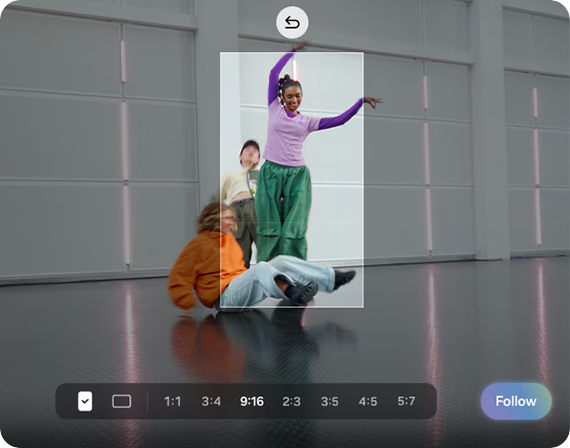
My FanCam Is a Useful Upgrade for Video
My FanCam could become one of the most practical One UI 9 features for people who record events family moments or sports.
The feature allows users to select a person from an existing video and automatically reframe the footage around that subject instead of recording separate footage for everyone you can shoot a wider video and later create a subject-focused version.
Samsung says my fancam automatically tracks the selected person and keeps them centered as the scene changes the resulting footage can then be adjusted to the desired aspect ratio.
That makes the feature particularly relevant for people who regularly create content for social media.
Photo Assist Gets More Natural Editing
Samsung is also expanding Photo Assist its ai powered photo editing system.
One UI 9 allows users to describe the edit they want using natural language, including by speaking rather than manually searching through multiple editing controls.
You can essentially explain what you want changed and let the ai assisted editing system handle the adjustment.
Samsung has also made photo assist available across a wide range of languages as of july 2026, samsung lists support for 41 languages, although availability can still depend on the device and region.
Now Brief Becomes More Personalized
Samsung introduced now brief as a way of providing useful information about your day in one place one ui 9 expands that idea with greater customization.
Users can now have more control over the information included in their briefings samsung has also introduced generative and editable cards allowing users to choose information across areas such as health weather and video.
The updated Now Brief can also provide action buttons meaning information can be connected directly to an action.
Creative Studio Gets Smarter Suggestions
Samsung’s creative studio is also receiving an AI focused improvement.
One UI 9 can suggest image generation ideas around upcoming events samsung gives the example of a friend’s birthday, where the software may suggest creating a themed image or greeting.
This is another example of samsung moving galaxy ai beyond simple commands and toward context-based suggestions.
Better Interpreter Experience
Samsung has also improved its Interpreter feature.
One UI 9 introduces a new thread view that makes translated conversations easier to follow by allowing users to refer back to earlier exchanges.
Samsung also says conversation mode translation has become faster while compatible galaxy buds can provide quicker playback.
For people who frequently communicate across languages these changes could make live conversations feel less interrupted.
Read This Also: Best Smart Home Devices 2026: 12 Gadgets That Actually Make Your Home Smarter (Not Just Fancier)
Improved Document Scanning
One UI 9 also brings an upgrade to samsung’s document scan feature.
The software can handle difficult documents more effectively including curved book pages and papers with folded corners samsung says the updated system requires less manual adjustment, while large screen devices get optimized views.
This is the kind of feature that may not attract as much attention as galaxy ai, but it can be genuinely useful for students, professionals and people who regularly digitize paperwork.
Voice Recorder Summaries Become Easier to Read
Samsung is also improving the way voice recorder presents summaries.
Instead of giving users a simple block of generated text, One UI 9 can organize summaries using elements such as headings and tables.
That should make long recordings easier to review, particularly for meetings, interviews and lectures.
One UI 9 Design and User Interface Changes
One UI 9 is not a complete visual redesign samsung has instead focused on refining the existing interface.
The company says the update includes optimized layouts, redesigned navigation elements and smoother interactions samsung’s one ui 9 interface has also been designed with different screen sizes.
Samsung has also improved quick panel customization users get more control over elements such as brightness, volume and media controls including additional sizing and arrangement options.
For foldable phones the changes are more noticeable because One UI 9 has been optimized for cover and main displays.
Better Multitasking and Multi Window
Multitasking is another area samsung continues to improve.
One UI 9 supports two way and three way split-screen views allowing compatible applications to be arranged more flexibly.
Samsung has also improved dex window management including additional snapping arrangements and for galaxy users who use their phone as a productivity device these changes may be more valuable than visual tweaks.
One UI 9 Privacy and Security Features
Security is another major part of the update.
Samsung has introduced security brief, which can bring security and privacy information into now brief. It can alert users about issues such as malware, unknown source applications and unnecessary permissions.
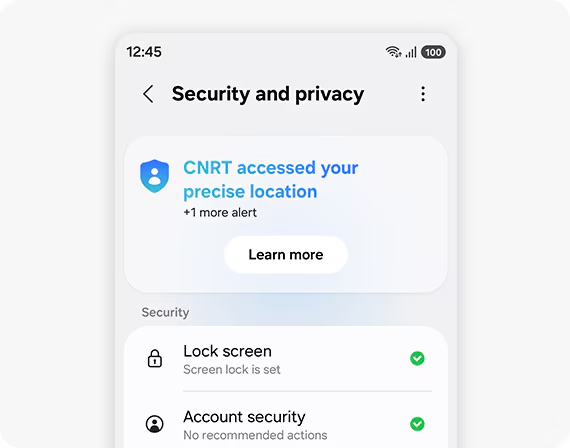
Privacy Alerts
One UI 9 also introduces privacy alerts that use on device ai to identify potential privacy risks.
Samsung says the system can look for potentially unnecessary background permission activity and other possible privacy concerns.
The broader galaxy security system continues to use Samsung technologies such as Knox, Knox Vault, KEEP and the Personal Data Engine.
Samsung says the personal data engine is designed to process personal data securely on the device, while keep provides encrypted storage for sensitive information.
Scam Detection Comes to More Users
Samsung is also expanding scam detection to additional markets and languages.
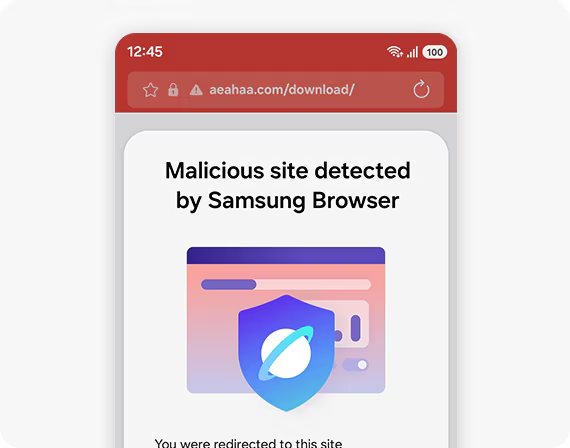
Importantly for indian galaxy users, samsung says scam detection will be available in India, alongside Japan and Canada availability can still vary depending on the device, language and software version.
Which Samsung Galaxy Phones Will Get One UI 9?
The One UI 9 rollout is expanding beyond Samsung’s newest flagship phones.
Samsung has officially confirmed the rollout to newer galaxy devices, while broader eligibility information is based on samsung’s software-support policies and device-specific indications.
Among the Galaxy phones listed as eligible by current tracking based on Samsung’s update policies are:
- Galaxy S26, S26+ and S26 Ultra.
- Galaxy S25, S25+ and S25 Ultra.
- Galaxy S25 FE.
- Galaxy S24 series and S24 FE.’
- Galaxy S23 series and S23 FE.
- Galaxy Z Fold7 and Z Flip7.
- Galaxy Z Fold6 and Z Flip6.
- Galaxy Z Fold5 and Z Flip5.
- Selected Galaxy A, M, F and XCover models.
The exact availability can vary by model and market, so users should not treat third-party eligibility lists as a guarantee.
Read This Also: How to Create a Monthly Budget for Beginners: Stop Wondering Where Your Paycheck Went
What About Samsung Galaxy Tablets?
One UI 9 is not limited to smartphones.
Samsung is extending the software experience to supported galaxy tablets as well current eligibility information includes newer Galaxy Tab S models, selected Tab S FE devices and certain Tab Active and Tab A models.
The tablet experience can benefit particularly from the improvements to multitasking, large-screen document scanning and multi window functionality.
How to Download One UI 9
If your Galaxy device is eligible and samsung has released the update for your region checking for One UI 9 is straightforward.
Go to
Settings → Software update → Download and install → Check for updates.
Samsung confirms this is the standard process for checking whether the latest one ui software is available.
If you do not see the update immediately, that does not necessarily mean your phone is unsupported samsung releases major updates in stages and availability can depend on region, carrier and device model.
Final Thoughts
Samsung One UI 9 represents another step in Samsung’s effort to make Galaxy phones more personalized, context aware and useful in everyday situations.
Features such as now nudge, my fancam, photo assist and the updated now brief show where samsung is taking its software toward an experience that can understand more of what users are doing and reduce the amount of manual work involved.
Security is also receiving meaningful attention with privacy alerts, security brief and expanded scam detection adding another layer of protection.
The rollout is already beginning, but Galaxy owners should expect the timing to differ from one device and region to another.
For the most accurate information about your particular phone checking settings > software update and the samsung members app remains the safest approach.